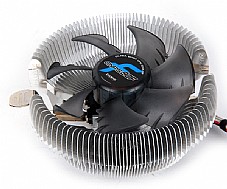
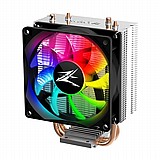
מאוורר למעבד ZALMAN CNPS90F

מאוורר למעבד איכותי ושקט ביותר מבית ZALMAN תומך מעבדי INTEL 1150/1151/1155/775/AM4.

אריזת RETAIL

אחריות ל-12 חודשים.

מאפיינים ושידרוגים:

פרטים נוספים:

  • מקט: ZALMAN-S90F
  • מספר תשלומים:  1
  • זמן אספקה: עד5ימי עסקים
  • יצרן:  ZALMAN
רגיל רגיל 140.00

מחיר   55.00 ILS 8/7/2027 In stock ZALMAN ZALMAN-S90F ZALMAN-S90F

  • +
  • -
visaisracardmastercarddinersamerican express paypal bit apple pay google pay
SocketCPUCPU Compatibility
Intel1155/1156Core i7Supports all speeds
Core i5
Core i3
1150/1151Core i7Supports all speeds
Core i5
775Core 2 QuadSupports all speeds
Core 2 Duo
Pentium Dual Core
Pentium D
Pentium 4Prescott95W or lower
Cedar Mill95W or lower
Celeron DSupports all speeds
AMDFM1Llano95W or lower
FM2Trinity95W or lower
AM3+Vishera95W or lower
Zambezi95W or lower
AM3Phenom II95W or lower
Athlon IISupports all speeds
AM2+Phenom95W or lower
Athlon FXSupports all speeds
Athlon X2
Athlon
Sempron
AM2Athlon FXSupports all speeds
Athlon X2
Athlon
Sempron
940OpteronSupports all speeds
Athlon FX
939OpteronSupports all speeds
Athlon FX
Athlon X2
Athlon
754AthlonSupports all speeds
Sempron
Dimensions116(L) x 112(W) x 60(H)mm
Weight240g
Base MaterialPure Aluminum
Fan Size92mm
Bearing TypeFSB (Fluid Sheild Bearing)
Fan RPM2300rpm ±10%
Fan Noise29dBA
Connecter3-Pin
※ Please use Fan Mate 2 to change the fan speed.
The computer system may automatically shut down when booting the computer after the system monitoring program outputs a warning stating that the CPU fan is rotating slowly. In such a case, fully turn the Speed Control Knob in the clockwise direction before rebooting to disable the 'CPU Fan Detected' option in BIOS, or set the CPU fan's rotational speed to 1,350rpm or lower in the system monitoring program.
Some motherboards fail to boot if the rotational speed of the CPU fan is below a certain rpm. However, booting can be possible even at low fan rpm if the BIOS settings are updated. For more information on updating the BIOS, please refer to the
website of the motherboard's manufacturer. There are motherboards which fail to detect the rpm while operating the cooler in Silent Mode, but this does not affect computing performance.
Excessive force exerted on the fan may damage the fan, resulting in damage to the system.
Zalman Tech Co., Ltd. is not responsible for any damages resulting from CPU Overclocking.
Liquid metal thermal grease unlike the normal thermal grease it contains electrical conductivity and causes aluminum cooler to rust therefore please avoid using it. Corrosion and short circuits caused by using aluminum cooler are users' responsibility, so please read this carefully before using. (EX: Liquid Pro, Liquid Ultra etcs)


SocketCPUCPU Compatibility
Intel1155/1156Core i7Supports all speeds
Core i5
Core i3
1150/1151Core i7Supports all speeds
Core i5
775Core 2 QuadSupports all speeds
Core 2 Duo
Pentium Dual Core
Pentium D
Pentium 4Prescott95W or lower
Cedar Mill95W or lower
Celeron DSupports all speeds
AMDFM1Llano95W or lower
FM2Trinity95W or lower
AM3+Vishera95W or lower
Zambezi95W or lower
AM3Phenom II95W or lower
Athlon IISupports all speeds
AM2+Phenom95W or lower
Athlon FXSupports all speeds
Athlon X2
Athlon
Sempron
AM2Athlon FXSupports all speeds
Athlon X2
Athlon
Sempron
940OpteronSupports all speeds
Athlon FX
939OpteronSupports all speeds
Athlon FX
Athlon X2
Athlon
754AthlonSupports all speeds
Sempron
Dimensions116(L) x 112(W) x 60(H)mm
Weight240g
Base MaterialPure Aluminum
Fan Size92mm
Bearing TypeFSB (Fluid Sheild Bearing)
Fan RPM2300rpm ±10%
Fan Noise29dBA
Connecter3-Pin
※ Please use Fan Mate 2 to change the fan speed.
The computer system may automatically shut down when booting the computer after the system monitoring program outputs a warning stating that the CPU fan is rotating slowly. In such a case, fully turn the Speed Control Knob in the clockwise direction before rebooting to disable the 'CPU Fan Detected' option in BIOS, or set the CPU fan's rotational speed to 1,350rpm or lower in the system monitoring program.
Some motherboards fail to boot if the rotational speed of the CPU fan is below a certain rpm. However, booting can be possible even at low fan rpm if the BIOS settings are updated. For more information on updating the BIOS, please refer to the
website of the motherboard's manufacturer. There are motherboards which fail to detect the rpm while operating the cooler in Silent Mode, but this does not affect computing performance.
Excessive force exerted on the fan may damage the fan, resulting in damage to the system.
Zalman Tech Co., Ltd. is not responsible for any damages resulting from CPU Overclocking.
Liquid metal thermal grease unlike the normal thermal grease it contains electrical conductivity and causes aluminum cooler to rust therefore please avoid using it. Corrosion and short circuits caused by using aluminum cooler are users' responsibility, so please read this carefully before using. (EX: Liquid Pro, Liquid Ultra etcs)


לקוחות שראו מוצר זה קנו גם...

לא מצאתם את מה שחיפשתם? השאירו פרטים ונחזור אליכם בהקדם!

דלג לתוכן מרכזי