|
 Mesh Design for Effective Air Circulation (Front Bezel)
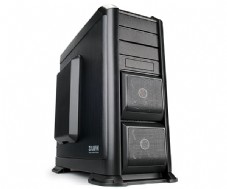
The front of case is designed with mesh for effective air circulation throughout the system, and dust filters are placed inside the mesh to prevent dust collection. Mesh Design for Effective Air Circulation (Front Bezel)
The front of case is designed with mesh for effective air circulation throughout the system, and dust filters are placed inside the mesh to prevent dust collection. |
|
Maximum Cooling Performance by Large 200mm LED Fans
Large 200mm LED fans expel hot air quickly from the case, maintaining a cool and calm operating system.
(Left side (1) and top (1) panel) |
|
|
 |
| Dedicated HDD Cooling 92mm LED Fan
The dedicated 92mm HDD LED fans in front of the case blow cool air through the hard disk keeping the HDDs’ temperature to a minimum and reducing high temperature related errors for a stable operating system. |
|
USB 3.0 Ready for Rapid Data Transfer
USB 3.0 port allows a rapid data transfer rate up to 5 Gbps Max. |
|
|
 |
Tool-Free Enabled HDD Installation
The Tool-Free HDD Mount Trays allow easy HDD installation/
removal and maintenance. |
|
Docking Support on the Top of Case
The docking support on top of the case allows convenient
connection to HDDs.
* HDD and scratch-resistant pad for case are provided. |
|
|
 |
Spacious 350mm Interior for Convenient System Installation
The interior has been designed to be spacious for easy
installation and maintenance of various components, especially for large, high performance VGA card. |
|
Separate Apertures for Convenient CPU Cooler
Installation
Separate apertures for CPU cooler are provided for convenient
CPU cooler installation without having to remove motherboard
from case. |
|
|
 |
Tube Apertures for Liquid Cooling Systems
Tube apertures are provided at the rear of the case for
convenient water cooling set-up and maintenance. |
|
Cable Compartment for Neat Cable Management
The Cable Compartment enables tidy cable management and
unimpeded airflow for stable system operation. |
|
|
 |
SSD Support
Besides the existing HDD, GS1200 also supports SSD
(Solid State Disk). |
|
Hot Swap Support
By incorporating Hot Swap, cable free HDDs can be
connected immediately upon installation. |
|
|
 |
 |
- Main Unit
- Stand (front ×1, rear ×1)
- CPU 12V Extension Cable × 1
- Stand-Off × 11
- A Bolt(PH 6-32*12) × 12 [HDD]
- B Bolt(PH 6-32*6) × 24 [M/B, PSU]
- C Bolt(PWH M3*12) × 4 [Foot]
- D Bolt(PWH M3*6) × 4 [SSD]
- Cable Tie × 10
- HDD Pad
- User’s Manual |
|
|
|
|
 |
|
| Enclosure Type |
Full Tower |
| Dimensions |
260(W) x 570(H) x 640(D)mm |
| Weight |
12.4kg |
| Material |
Plastic, Steel and Aluminum |
| Motherboard Compatibility |
Standard ATX / m-ATX / E-ATX |
| Power Supply Compatibility |
Standard ATX / ATX12V |
| VGA Compatibility |
Full Size (350mm) |
| Drive Bay |
5.25" |
3 |
| Internal 3.5" |
6 |
| External 3.5" |
1 |
Cooling
Component |
Front |
92㎜ LED fan x 2 |
| Rear |
120㎜ fan x 1 |
| Top |
200㎜ LED fan x 1 |
| Side |
200㎜ LED fan x 1 |
| Front I/O Ports |
Mic x 1, Headphones x 1, USB 2.0 x 3, e-SATA x 1, USB 3.0 x 1 |
| Hot Swap Support |
SATA Ⅰ/ SATAⅡ |
| Color |
Black |
|
|
 |
 |
Please read this manual thoroughly prior to installation. |
|
 |
Before installing, check the components and condition of the product, and if any problem is found, contact the retailer. |
|
 |
Avoid inserting objects or hands into the system while it is in operation to prevent product damage and injuries. |
|
 |
Check the manual when connecting cables. Incorrect connections may cause short circuits leading to fire hazards. |
|
 |
Do not block the front intake vent or the rear exhaust vent. |
|
 |
Keep this unit away from heat sources, direct sunlight, water, oil, and humid environments, and place the unit on a flat, stable, vibration-free, and well-ventilated area. |
|
 |
Do not clean the product surface with chemicals or wet cloth. (chemicals: industrial brightener, wax, benzene, alcohol, paint thinner, mosquito repellent, aromatics, lubricant, detergent etc.) |
|
 |
Please wear gloves while handling this product to prevent injuries. |
|
 |
Product design and specifications may be revised to improve quality and performance. |
|
 |
Zalman Tech Co., Ltd. is not responsible for any damages due to external causes, including but not limited to, improper
use, problems with electrical power, accident, neglect, alteration, repair, improper installation, or improper testing |
|